
Slackware tagfiles
What are Slackware tagfiles? What purpose do they serve these days? Essentially tagfiles provide a list of all packages in a Slackware package series (a, ap, d, e, etc) and the installation priority (add, skip, recommended or optional) of each package. Tagfiles are used internally by the Slackware installer to manage the various prompting modes. User-made tagfiles can also be used to customise the installation.
Tagfile format
Each of the 15 Slackware package series has a tagfile: a/tagfile,
ap/tagfile, d/tagfile and so on.
Each line of a tagfile has the format package_name:tag where "package_name" is the base name of the package and the "tag" is the installation priority for the package. The tag values are:
- ADD — Mandatory package to be added.
- SKP — Package to be skipped.
- REC — Recommended package, but not mandatory.
- OPT — Optional package.
aaa_base:ADD
aaa_glibc-solibs:ADD
aaa_libraries:ADD
aaa_terminfo:REC
acl:ADD
acpid:REC
attr:ADD
bash:ADD
bcachefs-tools:ADD
bin:ADD
btrfs-progs:REC
bzip2:ADD
coreutils:ADD
cpio:ADD
cpufrequtils:OPT
cracklib:ADD
cryptsetup:OPT
dbus:REC
...
When the installer prompting mode uses a tagfile, the "ADD" and "SKP" tags are used to non-interactively add or skip packages, and the "REC" and "OPT" tags will prompt the user whether to install the package or not. Note that there are no packages tagged with "SKP" by default. Also, as far as I can tell, there is no functional difference between the "REC" and "OPT" tags.
Prompting modes and tagfiles
The Slackware installer has 7 prompting modes that you can choose from after the "PACKAGE SERIES SELECTION" step. Some of these prompting modes make use of tagfiles, either internal to the installer or external user-made tagfiles.
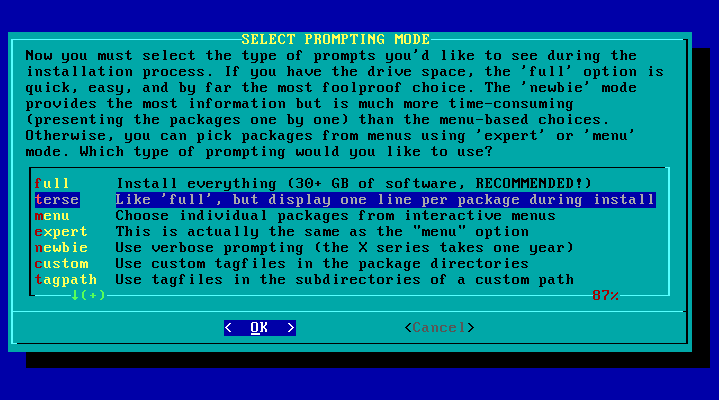
- full
-
Install all packages, showing a
dialogfor each package. - terse
-
Install all packages, showing a single line of text for each package. This is the default and recommended method.
- menu
-
For each package series, choose which packages to install using a list of checkboxes to toggle packages on or off, all packages initially selected (on).
- expert
-
Performs the same as "menu" mode.
- newbie
-
Install all mandatory packages and show a
dialogprompt for every non-mandatory package. - custom
-
Install packages according to a user-made custom tagfile in each package series.
- tagpath
-
Install packages according to user-made tagfiles located in a separate "tagpath" directory.
Choosing the prompting mode happens after the package series selection so if you have excluded one or more package series (eg., KDE) then none of the packages from those series will be installed, whatever prompting mode you choose.
full & terse modes
The "full" and "terse" modes are functionally identical, installing all
packages from the selected package series. The "full" mode will show the
package description in a dialog while installing. With the speed of media
these days, it is only for the larger packages that the description will
remain visible for long enough to read so the "terse" mode is recommended.
The default package series tagfiles are not used at all in the "full" or
"terse" prompt modes.
menu & expert modes
The "menu" and "expert" modes are functionally and visually identical. For
each package series you have selected to install in the previous step, you
will be presented with a dialog list of checkboxes, one checkbox for each
package in the package series. All packages in each package series are
selected by default. That is, the "menu/expert" mode does not follow the
package series tagfile, which may have some non-mandatory packages with "REC"
and "OPT" tags, but will select all packages for installation by default.
Having made your selection of packages to install from the package series, the "menu/expert" mode will then produce a custom tagfile for that package series that will be used to direct the installation based on your choices. Packages that you have left selected will have the "ADD" tag and packages you deselected will have the "SKP" tag. There will be no "REC" or "OPT" tags hence no further prompting of the user will be required.
Where do these checkbox lists come from? In addition to a tagfile, each
package series also contains the maketag and maketag.ez files. These are
shell scripts run by the installer to show the package series' checkbox list
and write out the custom tagfile. The maketag.ez ("easy") file is used by
the "menu" prompt mode and the maketag file is used for the "expert" mode.
Once upon a time, these two files would have been different but at some point
they were both made so that all packages are selected (checkbox=on) and so now
"menu" and "expert" are the same thing.
Looking at the help text for "menu" and "expert" modes seems to suggest at one time "menu" mode let you choose groups (or "systems") of packages in one go while "expert" mode was for selecting individual packages (the current behaviour).
newbie mode
In olden times, when package counts were in the mere hundreds, doing an interactive installation using the "newbie" prompting mode was manageable. Indeed, last century this was how I first used to do it. As of 2025, Slackware-current has over 1700 packages so the "newbie" mode is pretty much unusable.
The "newbie" mode uses the default package series tagfiles to direct
installpkg. All mandatory packages ("ADD" priority) are installed
automatically. For all non-mandatory packages ("REC" and "OPT" priority) the
installer shows a prompt dialog from which the user must choose whether to
add or skip the package.
At the time of writing in December 2025, slackware64-current has 1720 packages and the tagfile priority breakdown is as follows:
- ADD = 118
- REC = 1400
- OPT = 202
- SKP = 0
So in "newbie" mode, if you choose to install all package series, you will be prompted for a decision for 1602 packages. Good luck!
installpkg and tagfiles
The Slackware installer uses the standard installpkg script to handle the
package installation, with the "-root $ROOTDIR" option ensuring packages are
placed on the partitions prepared earlier in the setup procedure instead of
the installer’s root partition.
In the "full" and "terse" prompting modes, the "-priority ADD" option is used for all packages which overrides the package priority in the package series tagfile.
For all other prompting modes, the "-tagfile" option is used which makes
installpkg use an installer-specified tagfile to obtain the package priority
and decide whether to add, skip, or prompt the user. These tagfiles are:
- For "newbie" mode, the default package series tagfiles.
-
For "menu" and "expert" modes, the tagfiles created by running the
maketagscripts for each package series. - For "custom" and "tagpath" modes, the custom tagfiles supplied by the user.
User-made tagfile modes
The Slackware installer supports user-made tagfiles via the "custom" and "tagpath" prompting modes. These modes allow you to fully automate the package installation using only pre-selected packages without having to install everything as in "full/terse" mode.
|
Warning
|
Slackware doesn’t do dependency management. The recommended way to install
Slackware is to install everything using the "full" or "terse" prompting
modes. Doing a selective installation using tagfiles has the potential to
result in a broken system, especially if you leave out a critical package
like, say, kernel-generic. The Slackware installer will happily let you do
that.
|
The "custom/tagpath" modes use the same installpkg invocation as "newbie"
mode but use your tagfiles instead of the default package series tagfiles.
This means for a non-interactive install, you must ensure you only use the
"ADD" and "SKP" priority in your custom tagfiles. Any packages with the "REC"
or "OPT" priority will prompt for user selection, same as in "newbie" mode.
Of significance when using "custom/tagpath" mode to install
Slackware-current, any package file (*.t?z) in a package series that is
not listed in the user-made tagfile will be treated as if it had a "REC" or
"OPT" priority. That is, you will be prompted to choose whether to install the
package or not, making your installation process non-non-interactive. This
happens in Slackware-current when new packages are added to Slackware and you
don’t update your custom tagfiles to include the new package.
custom mode
In "custom" prompting mode, you place your modified tagfiles, distinguished by a "custom extension", in the package series directories of the Slackware repository you are installing from (the location chosen in the "SOURCE MEDIA SELECTION" step). Using this mode obviously depends on your ability to place files in the Slackware repository: difficult if installing from a Slackware DVD, easier if you are creating your own Slackware USB stick.
When choosing the "custom" prompting mode, the Slackware installer says your custom extension should be "a valid MS-DOS format file extension consisting of a period followed by three characters." However, as far as I can tell, the 3-character limitation does not apply — you can use a longer (or shorter) extension. If a package series does not contain a tagfile with your custom extension, the default tagfile will be used instead.
/path/to/slackware64-current/slackware64/
    a/
        tagfile
        tagfile.mytags
    ap/
        tagfile
        tagfile.mytags
    d/
        tagfile
        tagfile.mytags
    ...
So, for example, when I was using custom tagfiles to do an install on my
Asus Eee PC 701 with only 4 GB of storage, I created tagfiles
with the extension ".eeepc". In each of the 15 package series directories, in
addition to the official tagfile file, I placed a tagfile.eeepc file.
tagpath mode
The "tagpath" prompting mode requires you to provide a path to an alternate
directory, outside the Slackware repository, which duplicates the Slackware
package series directory structure and within which, each package series
directory contains a user-made tagfile (no extension).
/path/to/my_tagfiles/
    a/
        tagfile
    ap/
        tagfile
    d/
        tagfile
    e/
        tagfile
    ...
The question becomes where to place this "tagpath" directory such that it is accessible to the installer. One method I have used is with the USB installer:
-
Prepare a "tagpath" directory (say,
slackware.minimal) containing package series sub-directories and modified tagfiles. Ensure tagfiles are up to date with current and all tags are either "ADD" or "SKP". -
Create a USB installer using the
/usb-and-pxe-installers/usbimg2disk.shscript, including the full Slackware repository on the USB stick using the "--slackdir" option. -
Copy our
slackware.minimaldirectory to the root of the USB stick. -
Boot the USB installer and at "SOURCE MEDIA SELECTION", choose "Install from
a Slackware USB stick". The USB stick will be mounted at
/usb-stick. -
At "SELECT PROMPTING MODE" choose the "tagpath" option and specify
/usb-stick/slackware.minimalas the tagpath to use. - Sit back while the installer runs.
Creating custom tagfiles
maketag
It appears that at one time the Slackware installer had support for creating
custom tagfiles using the maketag scripts in each package series. In the
installer’s main /usr/lib/setup/setup script, there is the following code
which can never be called because there is no "MAKE TAGS" option in the
installer’s main menu:
if [ "$MAINSELECT" = "MAKE TAGS" ]; then
  SeTmaketag
fi
You can manually run the /usr/lib/setup/SeTmaketag script within the
installer. You are prompted for a custom tagfile extension and the location
of the directory (or floppy!) containing the maketag script — that is, a
package series directory. So to work, the package series directories accessed
by the installer have to be writable — won’t work if using a DVD ISO image.
To run this from the installer on each of the 15 package series would be
pretty unpleasant.
If you have a local copy of the Slackware repository, you could manually run
(as root) the makepkg script in each package series to generate a custom
tagfile for that package series. The custom tagfile would be created at
/var/log/setup/tmp/SeTnewtag (really
/var/lib/pkgtools/setup/tmp/SeTnewtag) so you would then have to move it
into the repository package series with a custom extension, or into your
separate "tagpath" directory as tagfile.
One problem with the maketag approach is you will always be starting from a
state where all packages are selected: there is no official way to use the
dialog interface to edit an existing tagfile. To make changes, you need to
edit the tagfile with a text editor and change tags to "ADD" or "SKP" as
required.
Slackware tagfile manager
The tagfile format is a very basic text file format making it easy to manipulate with simple scripts. I created a bunch of scripts, of dubious quality, that helped me prepare the tagfiles used to install Slackware-current on the the Eee PC.
These scripts can be found at https://git.sr.ht/~gslewis/stfm.
git clone https://git.sr.ht/~gslewis/stfm
The basic workflow is:
-
Create a copy of the Slackware tagfiles in a local directory, known as a
"tagfile set". See
get_tagfiles.sh. -
Make the tagfile set work as a non-interactive installation by changing all
"REC" tags to "ADD" and all "OPT" tags to "SKP". See
prepare_tagfiles.sh. -
Keep your tagfile set in sync with current by adding new packages and
removing removed packages. See
update_tagfiles.sh. -
If you have a
slackpkgtemplate containing all the packages you want to install, such as from within thelxc-slackwaretemplate, apply this template to the tagfile set. All packages in the template get the "ADD" tag, everything else gets the "SKP" tag. Seetemplate_to_tagfile.sh. -
Browse and edit your tagfile set in a
dialoginterface, similar tomaketag. Seestfe.sh— the Slackware Tagfile Editor. -
If using the "custom" prompting mode, copy your tagfile set to your
Slackware repository’s package series directories, applying your custom
extension. See
copy_custom.sh.